 Prompt Advisers
Field Notes · Claude Code
Claude Codex Setup a Mess? Here's the Fix
Claude Codex setup cluttered with dead skills and rules? Run one audit prompt, merge to one AGENTS.md, and get your tokens back. Start here.
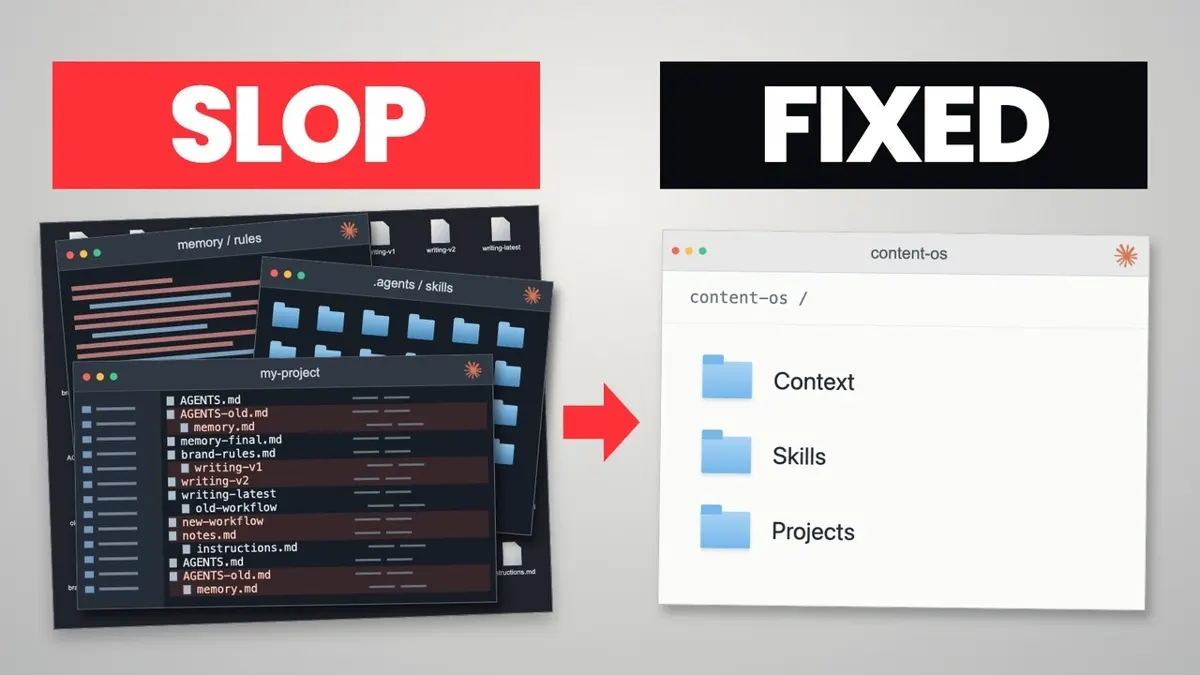
Your Claude Codex setup is a mess because skills, rules, and memory files pile up faster than you ever prune them, and the fix is a single audit prompt plus one shared AGENTS.md. You do not need a giant prompt or a new tool. You need to ask your AI to look at what you already have.
TL;DR
- A cluttered setup bloats your context window before you type a single prompt.
- One audit prompt scanned both Claude Code and Codex and returned a scored report in about 30 minutes.
- In my audit it found eight dead sound hooks left over from the early Claude Code days.
- One founder went from 15 skills to 3 that mattered, and from 1,400 Obsidian notes where only about 10% were relevant.
How a Claude Codex Setup Gets Out of Control
A messy Claude Codex setup comes from model hopping, not laziness. You probably went from Claude to Codex and back again.
Every move left something behind: a CLAUDE.md, an AGENTS.md, a Soul.md from an old OpenClaw setup, and memory files named "memory 2" and "final". I see this on dozens of founder calls.
Then you add every trending skill and repo. Together they overlap, send mixed signals, and never get updated.
What Should an AI Setup Audit Prompt Say?
An audit prompt should name what to check, what to compare it against, and what to report back. It does not need to be long.
Mine: "I switch between Claude Code and Codex all the time. Look through my whole setup in both and tell me what's working, what's dead weight, and what's missing." Then I list skills, rules, settings, plugins, agents, and projects.
Here is the part most people miss. I do not ask sub-agents to read every old chat, which burns tokens fast. I ask for a quick script that scans the JSONL session files for keywords like me pushing back or getting frustrated, and for which tools were called or never called.
I also ask for the report as a web page, not a markdown file. It is easier to judge each removal visually.
What Does the Audit Actually Find?
The audit finds dead weight you forgot you had. Mine took about 30 minutes and scored each area.
The surprises:
- Eight dead sound hooks from when Claude Code first launched and I wanted a ping when it finished.
- Rarely used Obsidian skills, since I stopped using Obsidian.
- Writing rules that belonged in one shared file both tools could load.
- Rules that conflicted between Claude and Codex, so offloading a task to the other tool gave odd results.
The Claude desktop app now also offers to run the low-risk config cleanups after the review. Nine times out of ten they had a small blast radius, and the scan used only a third of my context window.
Schedule this audit and you get a self-cleaning system that removes unimportant files untouched for seven months.
Can Claude Code and Codex Share One AGENTS.md?
Yes, Claude Code can now read an AGENTS.md, so one file can serve Claude, Codex, and Gemini. Until recently you needed both a CLAUDE.md and an AGENTS.md. The AGENTS.md format removes that duplication.
That small change makes you nimble and model agnostic. Skip the one percent tweaks every thumbnail screams about.
Sail from New York to Glasgow one degree off and you land somewhere else. Chasing every new skill does that to your agents.
For more on structuring the layers underneath, see my breakdown of an agentic OS.
What Does a Cleaned-Up Workspace Look Like?
A cleaned-up workspace has one top-level AGENTS.md acting as air traffic control, plus nested files per area of work. Only the outer file loads at session start.
I walked two founders through this.
Sarah runs several businesses and bounced between Claude, Gemini, and Codex. She had three instruction files competing at startup, 15 skills with only 3 that mattered, a global CLAUDE.md she forgot about, and 1,400 Obsidian notes. We merged to one AGENTS.md.
Beth runs launches and ads, with one folder per client and two second brains she used neither of. The fix was a one-hour dictation of how she works. We turned it into a playbooks folder with launch.md, webinar.md, and emails.md that the AI reads when needed. Each client folder got a nested AGENTS.md, which stopped client A's assets leaking into client B.
Should You Install That New Skill or Repo?
Probably not, unless it passes three checks.
- Frequency: Will it help on most of my tasks? If I did not have it, would I do my work worse?
- Scope: Is it only useful sometimes? Then load it on demand, not globally. Or point your AI at the repo for one task.
- Maintenance: Is there a scheduled job running the audit?
Better models need less leash, so expect fewer skills over time. Check the Claude Code memory docs and the Codex docs to see how each tool loads instructions. Our AI workshops and bootcamps cover this setup work.
Final Thoughts from Mark
Cleaning your workspace is the easy part. Cleaning your habits is harder. Run the audit, merge to one AGENTS.md, and ask the three questions before installing anything. Then let a scheduled job keep it tidy. More ideas: these Claude Code mods.
Claude Codex Setup FAQs
How do I clean up my Claude and Codex setup?
Ask your AI to audit both tools at once. Tell it to check skills, rules, instruction files, settings, plugins, agents, and projects, then report what works, what is dead weight, and what is missing. Review the report as a web page, approve the low-risk cleanups, and merge your instructions into one AGENTS.md.
Can Claude Code read an AGENTS.md file?
Yes. Anthropic added support for AGENTS.md, so you no longer need a separate CLAUDE.md just to match Codex. Gemini also uses a version of AGENTS.md. One shared file can now cover all three providers, with provider-specific extras only where a feature exists in one tool.
Why does my AI ignore my rules?
Usually because the rules conflict or pile up. Global files, project files, and old skills all load at session start and send mixed signals. Rules written for Claude may contradict the ones written for Codex. Pruning duplicates and keeping one source of truth fixes most of it.
Should I install every new skill or GitHub repo I see?
No. Ask three questions first. Is it useful on most tasks? Would your work be worse without it? Could you just point your AI at the repo for one task instead? Often a whole skill boils down to one line of instruction you can copy into your own.
How often should I audit my AI workspace?
Put it on a schedule. A scheduled task in Codex or the schedule command in Claude can run the audit report regularly and fix the low-risk items on its own. As models improve you will need fewer skills and rules, so the audit should shrink your setup over time.
By Mark Kashef
All field notes